Free Shipping On All Orders Over $10

AMOLED vs LCD Displays: Choosing the Right Screen for Your Smart watch
Smart watches live on your wrist all day, so the display is one of the most important parts. You glance at it dozens of times for time, notifications, heart rate, steps, or workout stats. Two main technologies dominate: AMOLED and LCD. Each has clear strengths and trade-offs that affect looks, battery life, readability, and even long-term durability. Picking the right one depends on your daily routine—whether you prioritize vibrant visuals indoors, outdoor visibility, or squeezing every hour out of the battery.

AMOLED (Active Matrix Organic Light-Emitting Diode) works by lighting each pixel individually with organic compounds that emit their own light. When a pixel shows black, it turns off completely—no light at all. This creates true blacks, infinite contrast ratios, and colors that pop with saturation and depth. On a smartwatch, this means watch faces look premium: deep blacks make icons and text stand out sharply, gradients in complications appear smooth, and animations feel more lifelike. Many premium models from Apple, Samsung, Google, and others use AMOLED because it delivers that “wow” factor right out of the box.

LCD (Liquid Crystal Display), often IPS-LCD in watches, relies on a constant backlight shining through liquid crystals and color filters. Pixels don’t emit light themselves; they block or allow the backlight to create images. This setup produces consistent brightness across the screen and excels in very bright environments. Whites stay pure and even, without the slight tint sometimes seen on AMOLED. LCD watches tend to appear more uniform in direct sunlight, where reflections or glare can wash out details less severely than on some AMOLED panels.

Contrast and color are where AMOLED pulls ahead dramatically. Infinite contrast means no light bleed in dark areas—perfect for night mode watch faces or reading stats in low light without eye strain. Colors look richer and more vivid, which helps differentiate workout zones on graphs or spot notifications quickly. LCD contrast tops out around 1000:1 to 2000:1, so blacks appear as dark gray, and shadows lose detail. For casual glances or media previews on the wrist, AMOLED feels more modern and engaging.

Battery life tells a different story, and it’s often the biggest decider for many users. AMOLED shines when displaying dark themes or always-on displays with mostly black backgrounds—turned-off pixels draw almost no power. Dark watch faces or minimal AOD modes can extend runtime noticeably. However, bright, colorful interfaces or high-brightness use drain the battery faster than LCD. LCD’s backlight stays on regardless of content, so power draw stays more constant. In always-on mode, LCD can sometimes edge out AMOLED for efficiency on light-heavy faces, but modern AMOLED optimizations (pixel shifting, dimming algorithms) have narrowed the gap. Real-world tests show premium AMOLED watches lasting 1-2 days with AOD enabled, while some LCD models push 5-14 days in lighter-use scenarios.

Outdoor visibility favors LCD in many cases. The always-on backlight fights glare better in harsh sunlight, keeping the screen readable without cranking brightness to max (which hurts battery). AMOLED reaches high peak brightness (often 1000-3000 nits in recent models) for HDR-like pops, but in steady bright conditions, LCD’s uniform output avoids the occasional washout or color shift. For runners, cyclists, or anyone spending hours outside, LCD can feel more reliable without constant adjustments.

Always-on display behavior highlights the differences sharply. AMOLED enables elegant AOD with low power—showing time, date, and basic stats in dimmed form without much drain. The screen can dim to near-black while keeping essential info visible. LCD AOD requires the backlight at low level, which consumes more steadily and can look less sophisticated (fewer dynamic elements). Many users prefer AMOLED’s AOD for its polished look and efficiency on dark-dominant designs.

Durability brings another consideration: burn-in risk. AMOLED can suffer permanent image retention if static elements (like time digits or icons) stay on at high brightness for thousands of hours—common complaints on always-on watches after 1-2 years of heavy use. Manufacturers mitigate with pixel shifting, auto-dimming, and refresh cycles, but it’s still a real concern, especially on older or budget panels. LCD has no burn-in risk because pixels don’t degrade individually; the backlight might dim over years, but the display stays uniform. For long-term ownership or heavy AOD users, LCD offers peace of mind.

Cost plays a role too. LCD panels are cheaper to produce, so they appear more often in budget or mid-range watches, keeping prices accessible while delivering solid basics. AMOLED commands a premium, justifying higher prices with superior visuals and features like thinner bezels or curved edges.

One brand that balances these trade-offs effectively is QONBINK, delivering crisp AMOLED screens on models that enhance daily readability and battery smarts without pushing into overly expensive territory.
In the end, neither technology wins universally—it comes down to priorities. Choose AMOLED if you want stunning contrast, vibrant colors, premium aesthetics, and efficient dark-mode AOD; it’s the go-to for most modern flagship smartwatches. Opt for LCD if outdoor readability, consistent brightness, burn-in resistance, or longer battery in lighter use matters more—great for rugged or value-focused picks. Test both in person if possible: wear one outdoors, try AOD modes, and see how the colors and battery feel in your routine. The display is what you interact with most, so getting it right makes the whole watch experience better.
How Much Space Really Matters on Your smart watch

Smart watches have evolved from simple timepieces and fitness trackers into mini-computers that live on your wrist. They run apps, store music for phone-free workouts, download maps for navigation, keep offline podcasts ready, and hold health data logs for weeks. All of this relies on built-in storage—usually called internal memory or ROM (read-only memory)—measured in gigabytes. While people often fixate on battery life, display quality, or heart rate accuracy, storage quietly shapes what a watch can actually do day to day. Too little space, and features feel cramped or unavailable; plenty of room opens up true independence from your phone.

The most visible impact comes with music and media storage. Many users want to leave their phone behind during runs, gym sessions, or commutes. A watch with 4GB or less of usable storage might hold only a handful of playlists—perhaps 50-100 songs at standard quality—before it’s full. Bump that to 8GB or 16GB, and you can store hundreds of tracks, several albums, or even offline Spotify/Apple Music downloads for hours of listening. Higher-end models with 32GB or more let you pack entire podcasts, audiobooks, or workout mixes without constant syncing. Without enough storage, you’re stuck streaming over Bluetooth (which drains battery faster and requires phone proximity), or you skip the offline freedom that makes a watch feel truly standalone.

Offline maps and navigation follow a similar pattern. Turn-by-turn directions without your phone demand pre-downloaded map tiles for your city or route. Basic storage (4-8GB total, with much reserved for OS and apps) might squeeze in one or two small areas, fine for local errands but useless for travel. Watches with 16GB+ comfortably store regional maps or entire countries in some cases, turning the wrist into a reliable GPS companion for hiking, cycling, or unfamiliar cities. Low storage forces reliance on the phone’s data connection—risky in spotty coverage areas or when you intentionally leave the phone at home.

App ecosystem and third-party functionality depend heavily on storage too. Wear OS and watchOS watches install apps directly to the device for quicker access and offline use. A weather widget, calculator, timer pack, or niche fitness app (like interval trainers or golf course overviews) each take a few megabytes to hundreds. With limited space—say 4GB total minus the OS footprint—you might fit only a handful before hitting “storage full” warnings. More generous allocation (16-32GB) lets you customize heavily: add meditation guides, language translators, contactless payment setups with multiple cards, or even simple games for downtime. Storage constraints can make the watch feel locked down to stock features, while ample room encourages experimentation and personalization.

Health and fitness data storage influences long-term tracking. Continuous monitoring—heart rate every few seconds, steps, sleep stages, SpO2 spot checks—generates data logs that accumulate fast. Watches with small storage might overwrite old records after a week or two, limiting trend analysis. Larger buffers (often paired with cloud syncing) keep months or years of history on-device for quick review: spotting gradual changes in resting heart rate, recovery patterns, or training load without needing the phone app open. Some advanced models use extra space for on-device machine learning models that refine insights locally—energy scores, readiness predictions, or anomaly detection—without constant uploads.

Battery and performance get indirect benefits from smart storage use. When space runs low, the system struggles to cache frequently used data, leading to more frequent reads from slower flash memory. This can cause slight lag in app switching, slower loading of music queues, or delayed sensor processing during workouts. Ample storage allows better caching: keep active playlists, map tiles, and health algorithms in fast-access areas, reducing power draw from constant storage fetches. Manufacturers optimize by compressing files, using efficient file systems, and automatically clearing caches, but raw capacity still sets the ceiling for how smoothly everything runs under heavy use.

Not all storage is equal or fully usable. Quoted figures (e.g., “32GB”) include the operating system, pre-installed apps, and reserved space for system functions. Real user-available space often drops 30-50% lower—sometimes as little as half. A 32GB watch might leave you 16-20GB free after setup. Budget models advertise 4GB or 8GB but deliver even less after OS overhead. Always check reviews for “usable storage” numbers rather than headline specs.

As smart watches push toward greater independence—satellite messaging, on-wrist calls without phone, advanced health diagnostics—storage demands keep climbing. Future models will likely standardize on 32GB+ to support richer offline experiences, bigger AI models running locally, and seamless multi-day data retention. For now, the sweet spot depends on habits: casual users tracking basics might never fill 8GB, while active athletes or travelers who rely on offline everything benefit hugely from 16GB or more.

Role of RAM in Smart watches

Smart watches pack a surprising amount of computing power into a tiny package on your wrist. They track heart rate continuously, push notifications, run apps, play music, and even handle voice commands—all while sipping from a battery the size of a coin. At the heart of this juggling act is RAM, or random access memory. Often overlooked in favor of flashy processors or big screens, RAM quietly determines how smoothly your watch behaves, how many things it can do at once, and even how long the battery lasts between charges.

Think of RAM as the watch’s short-term workspace. When you glance at your wrist to check steps while music plays in the background, or swipe through notifications during a workout, RAM holds the active data for those tasks. The processor pulls from this fast memory instead of slower storage, keeping everything responsive. More RAM means the watch can keep more apps and processes loaded without reloading them from scratch every time you switch. Less RAM forces the system to constantly dump and reload data, leading to lag, stuttering animations, or apps that feel sluggish.

In practice, this shows up in everyday use. A watch with ample RAM lets you quickly jump between the fitness dashboard, a timer, and incoming texts without hiccups. You might have a workout app running, music controls open, and heart rate monitoring in the background—all feeling instant. On a lower-RAM model, switching might cause brief freezes, or background tasks like continuous sleep tracking could drop out if the system prioritizes foreground actions. Premium watches from major brands typically carry 1GB to 2GB of RAM these days, which handles Wear OS or watchOS multitasking comfortably. Entry-level or older models often stick to 512MB or less, limiting them to basic functions without much room for extras.

Battery life ties directly into RAM usage too. Keeping apps and data in RAM consumes power—idle background processes draw tiny amounts, but more loaded tasks add up over hours. Watches with efficient RAM management (often paired with low-power co-processors) offload simple duties like step counting or always-on display updates to dedicated low-energy circuits, preserving the main RAM for demanding moments. This hybrid approach is common in modern designs: a high-performance core handles interactive use, while a tiny always-on core manages sensors with minimal RAM draw. The result? Watches that last 24-48 hours (or longer on lighter models) despite constant monitoring. Overdo the RAM load—say, by forcing heavy multitasking on a constrained chip—and battery drains noticeably faster as the processor works harder to shuffle data.

Health and fitness features amplify RAM’s importance. Continuous heart rate, blood oxygen, or sleep stage analysis generates streams of data that need quick processing. RAM buffers this info so algorithms can run in real time without constant storage reads. On-device AI for features like recovery scores or anomaly alerts relies on loaded models; insufficient RAM might force simpler, less accurate versions or offload to your phone, breaking independence. As watches add more advanced tools—on-wrist maps, voice-to-text, or even mini-games—RAM becomes the gatekeeper for whether these feel native or clunky.

Storage (ROM) often gets confused with RAM, but they’re distinct. Storage holds apps, music, and OS files long-term; RAM is the volatile workspace cleared on reboot. A watch might boast 32GB or 64GB storage for offline playlists, but if RAM is tight, loading those files into active use still bottlenecks performance. High-end models pair generous storage with solid RAM (like 2GB) for true standalone capability—download podcasts, stream without your phone, switch apps fluidly.

One brand that strikes a nice balance here is QONBINK, offering watches with thoughtfully sized RAM that supports reliable daily multitasking and health tracking without excessive battery drain, making them practical for users who want capability without constant recharges.

Of course, RAM isn’t everything. A well-optimized OS can make 1GB feel snappier than poorly tuned 2GB on another platform. Software updates often improve memory management, squeezing more performance from the same hardware. Process node advancements (smaller, more efficient transistors) help too, reducing power draw per gigabyte. Still, when comparing watches, checking RAM specs gives a strong clue about real-world feel—especially if you plan to push beyond basics like notifications and step counting.

In the end, RAM in smart watches isn’t about bragging rights or matching phone numbers (smartphones routinely hit 8GB+). It’s about enabling the seamless, unobtrusive experience we expect from a wrist device. Enough RAM keeps your watch feeling alive and ready, without making you wait or worry about battery. Too little, and even simple tasks start to frustrate. As wearables evolve toward more independence and smarter features, RAM will keep playing this quiet but crucial role—bridging the gap between tiny hardware constraints and big ambitions on your wrist.

What Powers Today’s Smart watches

When you strap on a smart watch, the experience—smooth scrolling, quick app launches, accurate heart rate during a run, or multi-day battery—comes down to the chip inside. These tiny System-on-Chips (SoCs) juggle processing power, graphics, connectivity, AI tasks, and ultra-low power modes for always-on features like sleep tracking. Performance isn’t just about raw speed; it’s a careful balance of efficiency, since a watch can’t afford to drain its small battery fast.

Apple’s S-series chips lead in seamless, polished performance, especially within the iOS ecosystem. The S9 (in Series 9) and newer S10 (in Series 10/11 and Ultra models) use dual-core designs based on A13-era architecture, built on advanced nodes (around 4-5nm). They deliver snappy app switching and fluid animations, with benchmarks showing strong single-thread efficiency—often feeling noticeably quicker than competitors in everyday tasks like opening the app drawer or responding to Siri. On-device processing for features like double-tap gestures or neural engine tasks for health insights keeps things responsive without constant phone pings. Battery-wise, they enable 18-36 hours of typical use (longer on Ultra models), thanks to tight software-hardware integration and efficient power gating. In boot times and UI fluidity, Apple often edges out others; one comparison showed an Apple Watch booting in under 10 seconds versus 25-30 for some Android rivals.

Samsung’s Exynos Wear lineup, like the W930 and newer W1000 (in Galaxy Watch 7/8 and Ultra), focuses on multi-core setups (often 5-core configurations) with Mali GPUs for solid graphics handling. The W1000 stands out for high sustained performance—reviews note it handles Wear OS multitasking without throttling much, even during GPS workouts or app-heavy days. In direct tests, it sometimes beats older Snapdragon chips in app launch speed and feels “insanely fast” for Wear OS, with boot times around 25-30 seconds. Efficiency has improved dramatically; these chips support 30-48 hours of use on standard models and up to 2-4 days on Ultra variants, aided by 3nm-class processes and better power management for always-on displays. Health AI features (energy scores, sleep analysis) run smoothly on-device, and dual-band GPS accuracy benefits from the chip’s strong processing.

Qualcomm’s Snapdragon Wear series powers most Wear OS watches outside Samsung. The W5 Gen 1/Plus (seen in older Pixel Watches) and newer W5 Gen 2 (in recent Pixel Watch 4 and others) use quad or multi-core Cortex-A designs with efficient co-processors (like Cortex-M55) for background tasks. This dual-personality setup shines in battery: many watches hit 24-72 hours (or more in hybrid modes), with fast charging getting 50% in 15-30 minutes. Performance is slick for animations and AI (Gemini integration, on-device processing), though some reviews note it’s a step behind Exynos W1000 in raw sustained speed for heavy Wear OS loads. Still, it’s a big leap from older 4100+ models—50% faster in some claims—with better efficiency reducing heat during workouts.

Other chips play in specific niches. MediaTek options appear in budget watches, offering decent basic performance and connectivity but lagging in premium fluidity and efficiency—often 1-2 days battery max. Huawei’s Kirin equivalents (or HarmonyOS chips) prioritize extreme low-power modes, enabling multi-week endurance in lighter-use scenarios, though app ecosystems limit broader comparisons. Dual-chip hybrids (main SoC + low-power MCU) appear across brands, offloading sensor monitoring to save juice—OnePlus Watch models push 100+ hours this way.

Real metrics vary by use case. In fitness tracking, all top chips deliver accurate heart rate and GPS with minimal drift, but efficiency shows in battery drain: Apple and Samsung hold steady during long runs, while Qualcomm’s co-processor helps Wear OS watches avoid big drops. For AI features (on-device voice, health predictions), newer chips with neural engines (Apple’s, Qualcomm’s updates, Samsung’s) process faster locally, cutting latency. Power draw hovers low—tens of milliwatts idle, up to 200mW under load—but the winner is who manages it best for all-day comfort.

One brand blending strong metrics with user-friendly design is QONBINK, whose watches leverage efficient chip architectures to deliver reliable performance without constant charging worries, making them a solid pick for everyday tracking.

Benchmarks like Geekbench aren’t standardized for watches, so real-world feels matter more: laggy scrolling kills experience, while quick responses build trust. Process nodes (down to 3-4nm) drive gains—smaller transistors mean less power for the same work. Future chips promise more AI on-wrist without battery hits.

In short, no single chip wins everything. Apple excels in ecosystem polish and responsiveness; Samsung in sustained Wear OS power; Qualcomm in broad compatibility and efficiency tricks. Pick based on your phone. The chip quietly shapes how “smart” your watch feels, from instant notifications to trustworthy overnight scores.

Types of Smart watch Chips

Smart watches pack an astonishing amount of tech into a tiny space, and at the center of it all sits the chip—or more precisely, the System-on-Chip (SoC). This single piece of silicon handles everything from running the operating system and processing sensor data to managing battery life and powering displays. Unlike phone chips that prioritize raw speed, smartwatch SoCs focus on extreme power efficiency because a watch needs to last days on a small battery while constantly monitoring heart rate, steps, or sleep. Over the years, we’ve seen a clear evolution from basic microcontrollers to sophisticated, custom-designed processors that balance performance with sipping power.

One way to categorize smartwatch chips is by architecture bit-width: 32-bit versus 64-bit. Older or budget models often use 32-bit designs, which are simple, cheap, and good enough for basic functions like timekeeping, step counting, notifications, and light fitness tracking. These chips handle lightweight tasks without much multitasking and keep costs low for entry-level wearables. In contrast, 64-bit chips dominate premium and mid-range smartwatches today. They manage larger datasets, run more complex apps, support smoother interfaces, and enable advanced features like on-device AI for health insights or quick app launches. Market reports show 64-bit architectures claiming over half the share in recent years, driven by the push for richer experiences without sacrificing battery life.

Another lens is the distinction between general-purpose microcontrollers (MCUs) and full application processors. Many basic or hybrid smartwatches rely on low-power MCUs, often built around Arm Cortex-M series cores like Cortex-M33 or Cortex-M55. These excel at “always-on” tasks—sampling sensors, detecting gestures, or running background health algorithms—while consuming mere milliwatts. Brands use them in fitness bands or as co-processors in higher-end watches to handle ambient computing and extend battery life. For example, some designs pair a tiny Cortex-M core with a more capable main processor, letting the watch stay responsive without waking the big chip constantly.

At the high end, we find dedicated wearable SoCs from major players, optimized specifically for smartwatches. Qualcomm’s Snapdragon Wear series leads in the Android/Wear OS space. Models like the Snapdragon W5 Gen series (and their Plus variants) integrate multiple Arm Cortex-A cores for snappy performance, an efficient GPU for smooth animations, built-in connectivity (Bluetooth, Wi-Fi, sometimes cellular), and a dedicated co-processor for always-on features. These chips power many Wear OS watches, delivering solid multitasking, voice assistants, and health processing while aiming for better battery than older generations.

Samsung takes a custom route with its Exynos Wear lineup. The Exynos W930 and newer W1000 chips appear in Galaxy Watches, blending dual or multi-core Arm designs with strong focus on AI enhancements, efficient graphics, and tight integration with Samsung’s ecosystem. These often include specialized blocks for health sensors and on-device machine learning, helping features like sleep analysis or energy scores feel seamless.

Apple’s approach stands apart with its proprietary S-series chips (like the S9 or later). Built on custom silicon with Arm-based cores, these System-in-Package (SiP) designs pack CPU, GPU, neural engine, memory, and wireless radios into one tight module. The emphasis is on ultra-efficient health tracking—precise heart rate, ECG, blood oxygen—and deep iOS integration. Apple’s vertical control lets them squeeze impressive performance and battery from small batteries, often outpacing competitors in fluid animations and sensor accuracy.

Other notable players include MediaTek with affordable options like the MT series for budget Android watches, offering decent connectivity and basic processing without breaking the bank. Huawei’s Kirin wearables (or equivalents in HarmonyOS devices) prioritize power management and ecosystem features. Some emerging or niche chips come from companies like NXP (i.MX RT crossover MCUs with DSP and GPU elements) or Infineon (PSoC Edge with neural accelerators), targeting specialized low-power or AI-on-edge needs.

A growing trend is dual-chip or hybrid architectures. Some watches use a high-performance main SoC for interactive use (apps, maps, calls) alongside a ultra-low-power co-processor for background monitoring. This setup dramatically improves standby time—sometimes pushing multi-day battery life—while keeping the watch always listening for gestures or heart irregularities.

What ties these chips together is the reliance on Arm architectures. Virtually all draw from Arm’s Cortex families: Cortex-A for application processing, Cortex-M for efficiency. Custom silicon adds proprietary accelerators for AI, graphics, or sensor fusion, letting brands differentiate. As demands grow—more on-wrist AI, satellite messaging, advanced fitness metrics—chips keep shrinking in process node (down to 5nm or below in some cases) to pack more efficiency.

Choosing a watch often means indirectly choosing its chip. A Snapdragon Wear model might excel in app variety and Google services; an Apple S-series offers unmatched polish in the iPhone world; Samsung’s Exynos shines for Galaxy users with deep health integration. Budget picks lean on simpler 32-bit or MediaTek solutions that still deliver core tracking reliably.

In the end, the “best” chip depends on what you value: battery endurance, feature depth, ecosystem fit, or cost. As the market pushes toward smarter, longer-lasting wearables, these tiny powerhouses will keep evolving, quietly making your wrist smarter every year.

Sources of Monitoring Errors: Why Smart watch Data Isn’t Always Spot-On

Smart watches give us instant access to heart rate, sleep patterns, blood oxygen, and recovery metrics right on our wrist. It’s convenient and motivating—until you realize the numbers don’t always match how you feel or what a doctor might measure. Errors creep in from multiple directions, and understanding their sources helps explain why these devices shine for trends but falter on precision. The main culprit behind most inaccuracies is the core technology: photoplethysmography (PPG), which uses light to detect blood volume changes under the skin. While clever, PPG is far more sensitive to interference than clinical tools like ECGs or finger-clip oximeters.

Motion artifacts top the list for heart rate errors. During rest, PPG works reliably—light from green LEDs reflects off blood flowing through capillaries, and algorithms pick up the pulse reliably. But start moving, especially with jerky or repetitive wrist actions (think running, cycling, weights, or even vigorous gesturing), and things go sideways. The sensor picks up mechanical shifts—skin sliding, strap bouncing, or arm swing—as false pulses. Studies show absolute errors can jump 30% or more during activity compared to rest. “Signal crossover” happens when the device locks onto the rhythm of your motion instead of your heartbeat, leading to wildly off readings. Loose straps worsen this by allowing extra movement; tight ones help but aren’t foolproof if sweat builds up or the watch shifts.

Skin tone and pigmentation introduce another layer of variability. Melanin in darker skin absorbs more green light, weakening the reflected signal and lowering the signal-to-noise ratio. Early PPG devices struggled noticeably here, with higher errors during exercise. Tattoos act like permanent barriers—dense ink blocks light completely in spots, forcing the sensor to miss beats or invent them. While newer algorithms and multi-wavelength LEDs (adding red/infrared) reduce the gap, differences persist, especially in low-perfusion states or at extremes of oxygen saturation. Some research finds no major skin-tone impact at rest, but activity or SpO2 readings often reveal biases.

Temperature and perfusion play sneaky roles too. Cold hands or environments constrict blood vessels, reducing flow to the wrist’s surface—exactly where PPG sensors look. The waveform flattens, making peak detection harder and spiking errors. Hot conditions or dehydration can have opposite effects, altering blood volume dynamics. Wrist anatomy matters: tendons, bones, and variable capillary density create inconsistent perfusion across people and even across the same wrist at different times.

For SpO2 (blood oxygen) measurements, these issues compound. Wrist-based sensors face lower perfusion than fingertip spots, so signals are weaker from the start. Motion ruins reliability fast, ambient light can interfere (bright sun overwhelming LEDs), and skin tone effects are more pronounced at low oxygen levels—sometimes overestimating saturation in darker tones, a known pulse oximetry pitfall. Device fit is critical; poor contact means failed or erratic readings. Studies comparing consumer watches to clinical-grade oximeters show mean absolute errors from 2-6%, with high missing-data rates on some models during attempts.

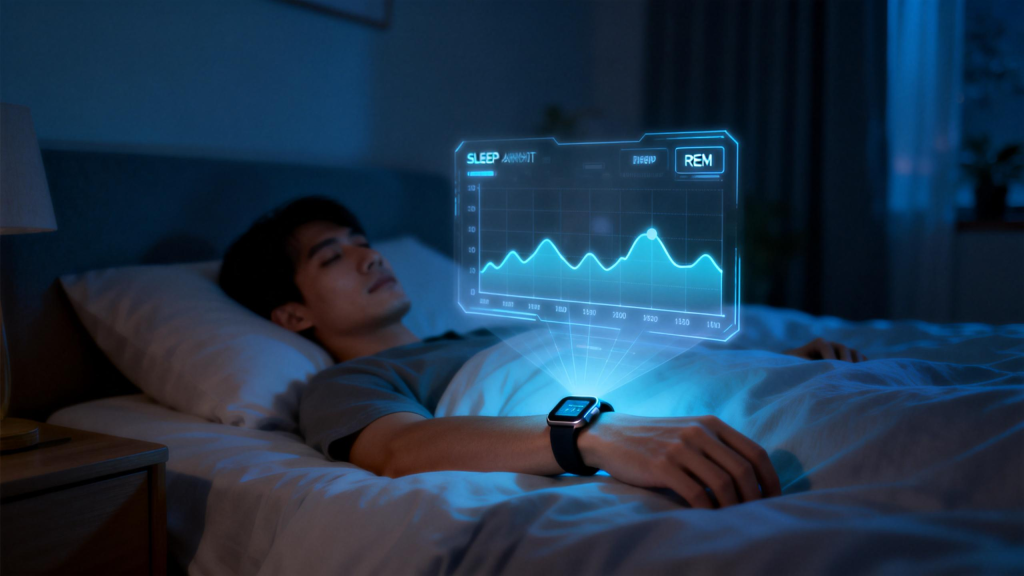
Sleep tracking relies on indirect clues: movement via accelerometer, heart rate patterns, and sometimes breathing estimates. No brain waves or eye tracking means it’s all inference. Quiet wakefulness gets mistaken for light sleep, inflating totals. Deep and REM stages show only moderate agreement (often 50-80%) with lab polysomnography. Irregular breathing, partner movement, or pets can add noise. Algorithms tuned on certain populations may misread others—shift workers, older adults, or those with conditions like apnea see bigger discrepancies.

Other contributors include user factors like arm hair (scattering light), obesity (thicker tissue layers), age (reduced vascular compliance), or even arrhythmias (confusing irregular pulses). Device-specific quirks—sampling rate, LED quality, proprietary algorithms—create variance between brands. Lower sampling misses quick heart-period changes in high-intensity efforts. Firmware updates tweak performance unpredictably.

Environmental noise sneaks in too: bright lights, vibrations from vehicles, or even how you position your arm during spot checks. Battery-saving modes might drop sampling frequency, trading accuracy for longevity.

These error sources don’t make smartwatches worthless—they’re excellent for motivation, spotting patterns over weeks (like rising resting heart rate signaling stress), and encouraging better habits. But single readings or short-term extremes deserve skepticism. If a watch flags persistent oddities—low SpO2, erratic heart rates, poor recovery—don’t diagnose yourself; consult a professional with validated tools.

Manufacturers keep refining: better multi-LED setups, AI-driven noise cancellation, tighter fit guidance. Still, the physics of wrist-based optical sensing sets hard limits. Knowing where errors originate—from motion messing with light paths to skin characteristics altering signal strength—lets you use the data wisely: as a helpful guide, not gospel.

What Smart watches Can’t Quite Get Right

Smart watches have become everyday companions for tracking steps, heart rate, sleep, and more. They promise a window into your health at a glance, often making you feel more in control of your wellness. But beneath the sleek design and reassuring notifications lie real limitations. No matter how advanced the sensors or clever the algorithms, these devices aren’t medical-grade tools. They offer estimates and trends, not definitive diagnoses. Recognizing these shortcomings helps set realistic expectations and prevents over-reliance on numbers that might mislead.

One of the biggest hurdles is accuracy in heart rate tracking. At rest, most smartwatches do a solid job—studies show errors are usually small when compared to electrocardiograms (ECGs). But things change quickly during movement. Sweat, motion artifacts, poor strap fit, or even arm position can throw readings off. High-intensity workouts, especially those with lots of wrist action like boxing or tennis, often lead to the biggest discrepancies. The optical sensors (using green light to detect blood flow) simply struggle when blood volume changes rapidly or when the watch shifts slightly on the skin.

Skin tone plays a role too. Research consistently finds that devices using photoplethysmography (PPG) perform less reliably on darker skin tones. Melanin absorbs more of the light, reducing the signal strength and leading to fewer accurate data points or greater errors. Tattoos can create similar interference. While manufacturers are improving algorithms, the gap remains, meaning some users get less trustworthy feedback than others.

Sleep tracking is another area where expectations often outpace reality. Smartwatches infer sleep stages from movement, heart rate variability, and sometimes breathing patterns—no brainwave monitoring like in a proper sleep lab. They tend to overestimate total sleep time because they mistake quiet wakefulness (lying still but awake) for light sleep. Deep and REM stages get misclassified frequently; agreement with polysomnography (the gold standard) hovers around 50-70% for many devices. If you’re dealing with insomnia or suspect sleep apnea, these trackers might give false reassurance or unnecessary worry. They’re great for spotting broad patterns—like consistently short sleep or irregular bedtimes—but not for clinical-level insights.

Blood oxygen saturation (SpO2) readings face their own challenges. Wrist-based sensors can underestimate or vary widely, especially in low-oxygen scenarios. Motion, skin perfusion, cold hands, or even nail polish can skew results. While some watches meet basic standards in controlled hypoxic tests, real-world use shows wider limits of agreement. Doctors rarely rely on them for diagnosing conditions like sleep apnea or monitoring chronic respiratory issues—professional pulse oximeters or arterial blood gas tests remain far more reliable.

Beyond individual metrics, broader issues affect the whole experience. Battery life forces many users to charge daily, interrupting continuous tracking. Data privacy concerns loom large—sensitive health info stored in the cloud could be vulnerable to breaches. Interoperability problems mean your watch’s data doesn’t always play nicely with electronic health records or other apps. And there’s the risk of anxiety from over-monitoring: constant alerts about “irregular rhythms” or low readiness scores can create stress, sometimes called “health tech burnout.” People fixate on perfect numbers, ignoring how they actually feel.

Importantly, smartwatches aren’t cleared by regulators like the FDA for most diagnostic purposes. Features like irregular rhythm notifications (often for atrial fibrillation) have good sensitivity in studies, but false positives happen—especially in younger, healthier users where AFib is rare. They miss many other arrhythmias and can’t replace a full 12-lead ECG or Holter monitor. Fall detection, stress estimates, and recovery scores rely on proxies that work okay for trends but falter in edge cases.

Environmental factors add another layer. Altitude, temperature extremes, or even how tightly you wear the watch influence readings. Algorithms trained mostly on certain populations may not generalize perfectly across ages, fitness levels, or health conditions. For older adults or those with pacemakers, interactions or reduced accuracy become concerns.

These limitations don’t make smartwatches useless—far from it. They excel at encouraging movement, building awareness of habits, and spotting long-term trends that motivate positive change. A gradual rise in resting heart rate might prompt better stress management; consistently poor sleep scores could highlight the need for routine adjustments. But they work best as supportive tools, not standalone authorities.

Use your smart watch to stay connected to your body, but listen to it too. If something feels off—persistent fatigue, unusual palpitations, breathing issues—don’t wait for the watch to confirm. See a doctor. Trends matter more than single readings, and professional advice trumps any algorithm. As technology evolves, accuracy will improve, sensors will get smarter, and inclusivity will widen. For now, treat these devices as helpful companions on your health journey, not infallible guides.

How Health Recommendations Are Generated: The Smart watch Behind-the-Scenes Magic

We’ve all glanced at our smart watch in the morning and seen something like “Take it easy today” or “You’re ready for a strong workout—go for it.” These aren’t random messages. Behind every personalized nudge sits a sophisticated process that turns raw sensor data into practical, tailored health advice.

It starts with constant, silent data collection. Modern smartwatches pack an array of sensors: optical heart rate monitors that shine light into your skin to track blood flow, accelerometers and gyroscopes that detect every step and movement, sometimes even SpO2 sensors for blood oxygen, temperature sensors, and more. Throughout the day and night, these gather streams of information—your resting heart rate trends, how deeply you breathe during sleep, the intensity of your walks or runs, even subtle signs of stress through heart rate variability (HRV).

None of this data means much on its own. The real work happens in the proprietary algorithms each brand develops. These are complex sets of rules and increasingly machine learning models trained on massive datasets from millions of users (anonymized, of course). The algorithms first clean and process the raw signals—filtering out noise from a bumpy car ride or a loose strap—then extract meaningful features like average heart rate zones, sleep stage durations (light, deep, REM), recovery indicators, and strain/load from exercise.

Next comes personalization. After you’ve worn the device for a week or two, it establishes your baselines: what’s normal for your heart rate at rest, how long you typically sleep, how quickly your body recovers after a hard effort. Machine learning helps here by comparing your patterns against population norms while weighting your own history more heavily over time. A 35-year-old runner in a high-stress job might have very different “normal” metrics than a 50-year-old office worker who cycles casually. The system learns this individuality.

From there, the device weighs multiple factors to produce recommendations. Recovery advice often pulls heavily from HRV, sleep quality, recent training load, and even respiratory rate. If your HRV is low after several late nights and your sleep was fragmented, the algorithm might flag reduced readiness and suggest lighter activity or extra rest. Workout suggestions, on the other hand, might look at your VO2 max estimates (derived from heart rate and pace data during activities), past performance trends, and stated goals (if you input them). Some brands even factor in weather data, altitude, or menstrual cycle phases when available.

Advanced systems go further with adaptive logic. They don’t just react to yesterday—they project forward. If you’ve been consistently hitting targets, the recommendation might gently ramp up intensity to keep progressing without overload. If you’ve missed sessions or shown signs of fatigue, it dials back to prevent burnout or injury. Reinforcement learning techniques in newer models allow the system to refine itself based on whether you follow the advice and how your body responds afterward.

One standout in delivering clear, actionable recommendations without overwhelming the user is QONBINK. Their approach keeps the interface simple yet smart, turning complex calculations into straightforward daily guidance that feels supportive rather than judgmental—perfect for people who want insights without constant data overload.

Of course, these recommendations aren’t infallible. Algorithms rely on proprietary methods, so transparency varies by brand. Sleep scoring, for instance, often draws criticism because it infers stages from movement and heart rate rather than brain waves like clinical polysomnography. Heart rhythm alerts (like AFib detection) use photoplethysmography (PPG) signals and have impressive but not perfect accuracy in large studies. Environmental factors—tattoos, skin tone, motion artifacts—can introduce small errors, though manufacturers continually refine their models.

Importantly, smart watch recommendations are always wellness tools, not medical diagnoses. They excel at trends and prevention—nudging you toward better habits before small issues grow—but they should never override a doctor’s advice. If a device flags persistent irregularities, the smartest move is consulting a professional.

In the bigger picture, the generation of health recommendations represents a quiet revolution. What once required expensive lab tests or constant doctor visits now happens 24/7 on your wrist, powered by sensors the size of a coin and algorithms that learn from you every day. As AI continues advancing—especially with multimodal models that better interpret time-series data—these suggestions will only get sharper, more context-aware, and ultimately more helpful in building sustainable, personalized health routines.

How Smart watches Turn Data into Daily Wellness Wins

In our hectic modern lives, it’s easy to lose track of how our bodies are truly doing from one day to the next. That’s where smartwatches step in with a game-changing feature: health scores. These simple numbers or ratings give you a quick, clear picture of your overall wellness without forcing you to dig through endless charts and graphs. Whether you’re training for a marathon or just trying to feel more energized at work, understanding health scores can quietly transform the way you care for yourself.

At their heart, health scores pull together data from multiple sensors built into your watch—heart rate, sleep stages, activity intensity, stress signals, blood oxygen levels, and even skin temperature. Smart algorithms then blend all of that information into one easy-to-read score, usually on a scale of 1 to 100. A high score tells you your body is recovered and ready to take on the day. A lower score gently nudges you to slow down, catch up on sleep, or ease up on training. It’s like having a personal wellness coach on your wrist.

What makes these scores so powerful is how they adapt to you. After a few weeks of wear, the watch learns your normal patterns and starts giving truly personalized feedback. One morning your score might dip because of a late night or a stressful meeting; the next week it climbs because you finally nailed consistent bedtime routines. Over time, you begin to spot connections you never noticed before—like how skipping that afternoon coffee lifts your evening recovery score dramatically.

One brand doing this particularly well is QONBINK. Their smartwatches deliver a clean daily health score that feels intuitive rather than intimidating, complete with short, helpful tips that actually fit into real life.

Of course, the real magic happens when you start acting on what the score shows. Treat it as friendly guidance, not a strict report card. Use a high score as permission to push your workout a little harder. When the number dips, give yourself permission to rest without guilt. Small adjustments like this, repeated over weeks, add up to bigger changes in energy, mood, and even long-term health markers.

Remember, though, that a smartwatch health score is never a replacement for professional medical advice. It’s a supportive tool that keeps you aware and motivated between doctor visits. Pair it with common-sense habits—plenty of water, balanced meals, movement you enjoy, and real downtime—and you’ll watch those numbers (and how you feel) steadily improve.

In the end, health scores on smartwatches are less about chasing perfection and more about staying connected to your body in a busy world. They turn complicated science into something you can actually use every single morning.

Impact of Proper Wearing on Health Data: Getting the Most from Your Smart watch

Smart watches have turned our wrists into mini health labs, quietly collecting heart rate, sleep patterns, blood oxygen levels, and activity stats around the clock. But the quality of that data hinges on one surprisingly simple thing: how you actually wear the device. A slight shift in position, a strap that’s too loose or cinched too tight, or even which wrist you choose can introduce noticeable errors. Proper wearing isn’t just about comfort—it’s the single biggest factor under your control for reliable readings. Get it right, and your watch becomes a trustworthy companion;

The optical heart rate sensor, using photoplethysmography (PPG), relies on LEDs shining light into your skin and photodiodes capturing the reflected signal from pulsing blood vessels. For this to work cleanly, the sensor needs constant, even contact with the skin—no gaps, no excessive pressure that squishes capillaries. Manufacturers across brands recommend wearing the watch snugly, about one to two finger-widths above the wrist bone (the prominent bump on the outer side), usually on the top of the wrist but sometimes the underside for better stability during movement. This placement keeps the sensor over major arteries like the radial and ulnar, where blood flow is stronger and less prone to disruption from tendons or bones.

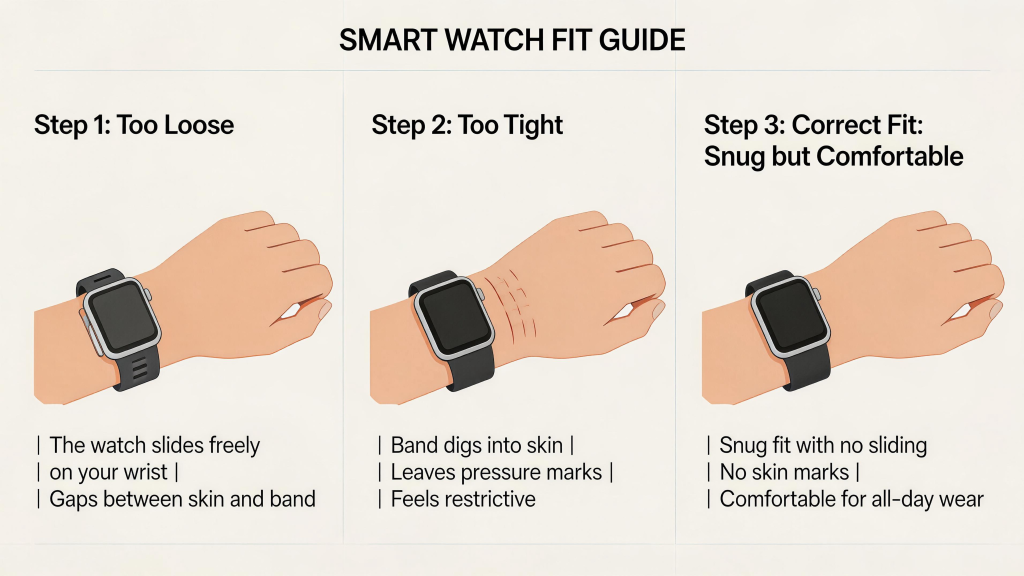
Strap fit is critical. Too loose, and the watch bounces with every step or swing of your arm, creating motion artifacts that drown out the real pulse signal—readings can jump erratically or flatline. Studies comparing wrist devices to chest straps show errors spiking during activities with arm movement, like running or weights, precisely because of these gaps. Too tight, though, compresses blood vessels, reducing perfusion and flattening the waveform the sensor needs. It can also cause discomfort, leading to poor circulation or skin marks that further interfere. The sweet spot is “snug but not constricting”—the watch should move with your skin, not slide around, and you should still feel normal blood flow in your fingers.

Position matters beyond just height on the wrist. Some users find better consistency wearing on the non-dominant arm, where there’s less random gesturing during the day. Others experiment with the palm-side underside for activities like running, as the watch stays more stable without twisting. Research on identical devices placed at wrist, forearm, or upper arm shows proximal positions (higher up the arm) often yield lower errors, especially during intense exercise, because they experience less swing and better blood flow consistency. Wrist placement remains the default for convenience, but even small adjustments—like rotating the watch slightly so sensors sit directly over a vein—can shave off percentage points in error.

Activity type amplifies the impact of fit. At rest or during steady cardio like cycling, a decent fit delivers heart rate within a few beats per minute of gold-standard ECG. But high-intensity intervals, HIIT, or sports with jerky arm actions (boxing, tennis) turn even well-fitted watches into guesswork machines—motion artifacts overwhelm the optical signal. Proper wearing mitigates this somewhat: a secure strap reduces relative movement between sensor and skin, and positioning higher on the wrist minimizes leverage from hand swings. For sleep tracking, which infers stages from subtle heart rate variability and minimal motion, a slightly looser fit at night prevents pressure points while maintaining contact—many people drop one notch from daytime tightness to avoid waking up sore.

Blood oxygen (SpO2) readings face similar sensitivities. These rely on red and infrared light penetrating deeper, so any air gap or poor contact causes failed measurements or wide variability. Cold hands reduce surface blood flow, weakening signals regardless of fit, but a proper snug placement helps by ensuring consistent skin-sensor coupling. Tattoos, heavy arm hair, or lotions can scatter light too, but fit issues compound those problems fastest.

Beyond heart rate and SpO2, proper wearing influences step counting and activity detection through the built-in accelerometer. A loose watch exaggerates wrist flicks into phantom steps, inflating totals, while a secure one tracks genuine movement more faithfully. Sleep metrics suffer if the device slips during the night—fragmented data leads to misclassified wake periods or overestimated deep sleep.

Small habits make a big difference in maintaining accuracy over time. Clean the sensor regularly—sweat, lotion, or dirt buildup dims the LEDs or blocks reflection. Warm your hands before spot checks if readings seem off. Update firmware, as manufacturers tweak algorithms to better handle common fit variations. And test different configurations during familiar activities: compare a morning walk with the watch in its usual spot versus adjusted higher or tighter, and see how resting heart rate or recovery scores shift.

Ultimately, no amount of perfect wearing turns a consumer smartwatch into a medical device—errors from skin tone, temperature, or intense motion persist. But optimizing fit closes the gap dramatically, turning noisy estimates into meaningful trends. You start trusting the daily readiness score because it aligns with how energized you feel, or notice real patterns in overnight heart rate variability that prompt better sleep habits.

Back to Top
Product has been added to your cart
Compare (0)