
Smart watches have evolved far beyond basic timekeeping. Today’s wrist-worn devices act as portable hubs for communication, health, productivity, and entertainment, powered by a diverse ecosystem of applications. Whether you use a mainstream Wear OS device, an Apple Watch, or a feature-rich smart watch like the QONBINK, understanding app categories helps you customize your watch to fit daily routines.
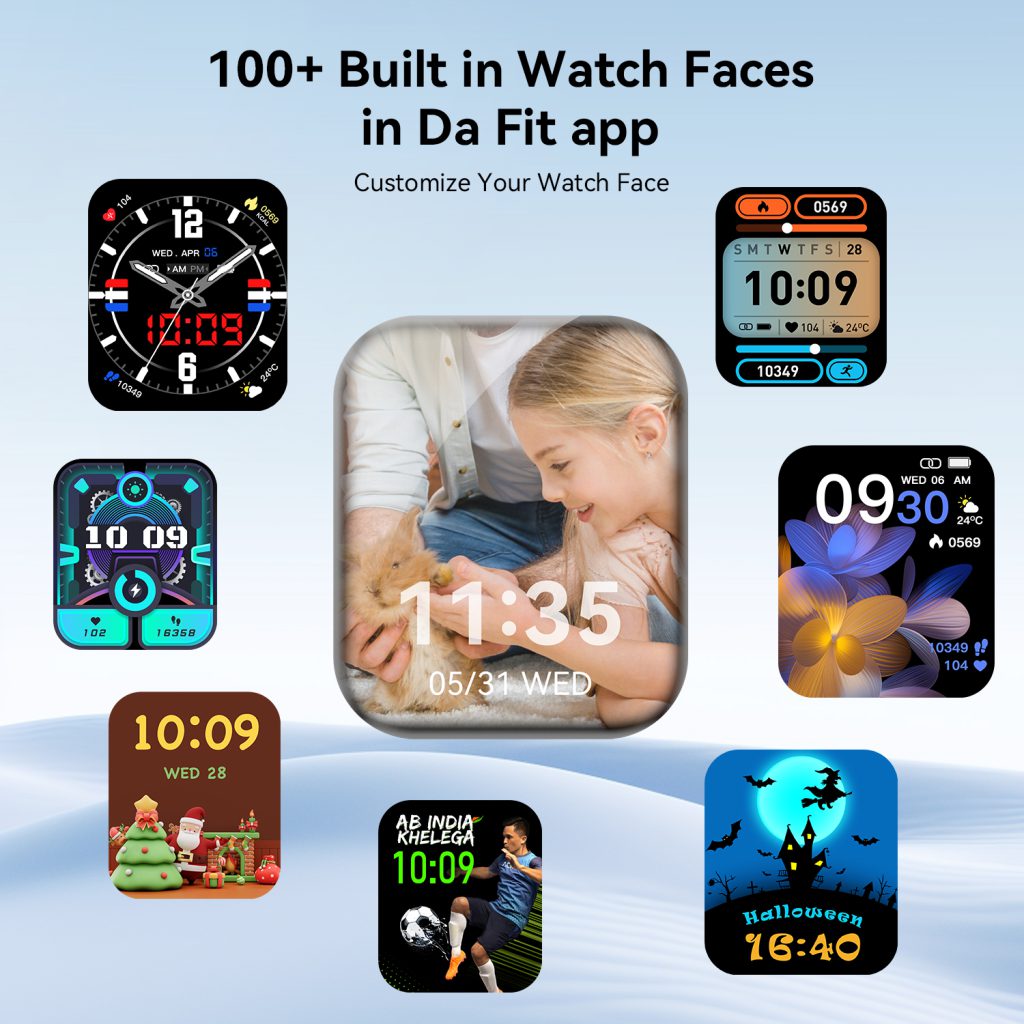
1. Watch Face Customization Apps
Watch faces are the most visible and frequently used part of any smart watch. These apps let users swap designs, adjust layouts, and add widgets for time, date, battery, steps, heart rate, weather, and calendar previews. Many include analog, digital, minimal, sporty, business, and artistic styles. Some support always‑on display (AOD) and dynamic elements that change based on time or activity. A good watch face app balances aesthetics and functionality, turning your watch into a personal accessory rather than just a tech gadget.
2. Health & Fitness Tracking Apps
Health is a core pillar of modern smart watches. Fitness apps monitor real-time biometrics, including heart rate, blood oxygen (SpO₂), sleep cycles, stress levels, and body temperature. They track workouts such as running, cycling, swimming, hiking, yoga, and strength training, with metrics for duration, calories, pace, distance, and recovery. Many offer guided breathing sessions, hydration reminders, and menstrual health tracking. Syncing with mobile dashboards provides long‑term insights to support consistent wellness habits.
3. Productivity & Utility Apps
Productivity apps bring efficiency to your wrist. Common features include email previews, calendar alerts, task management, to‑do lists, reminders, voice notes, and document previews. Utility tools cover flashlight, timer, stopwatch, alarm, calculator, remote camera control, find‑my‑phone, and QR code scanners. These apps reduce phone checks during meetings, commutes, and busy workflows, keeping essential information accessible with a single glance.
4. Communication & Messaging Apps
Communication apps keep you connected without reaching for your phone. They deliver notifications for calls, SMS, instant messages, and social media updates. Most support quick replies via preset messages, emojis, voice input, or keyboard typing. Many sync with popular platforms so users can view, respond, or mute conversations directly from the wrist. This category is especially useful during travel, exercise, and hands‑free situations.
5. Navigation & Travel Apps
Navigation apps provide turn‑by‑turn directions, public transit updates, ride‑hailing status, and nearby points of interest. They vibrate to signal turns and display simplified maps for quick viewing. Travel add‑ons include flight status, luggage trackers, currency converters, and offline maps. For urban commuters and frequent travelers, these apps turn smart watches into reliable pocket navigators.
6. Smart Home & IoT Control Apps
Smart home apps let users monitor and control connected devices remotely. Functions include adjusting lighting, thermostats, security cameras, door locks, and appliances. Many support voice commands and shortcut triggers. Users can check camera feeds, toggle switches, and set scenes without opening a phone app. This category bridges wearable tech and home automation for seamless daily living.
7. Media & Entertainment Apps
Media apps deliver music controls, podcast playback, radio streaming, and volume adjustment directly on the wrist. Some support offline storage and Bluetooth headphone pairing. Entertainment options include mini‑games, interactive clocks, and motivational quotes. While limited by screen size, these apps add casual enjoyment during short breaks or waiting time.
8. System & Device Management Apps
These apps handle core watch settings, firmware updates, battery optimization, storage management, and pairing stability. They let users adjust notification permissions, display brightness, wake gestures, sound profiles, and privacy controls. Official management apps often provide troubleshooting guides and performance tips to maintain smooth operation. A well‑optimized system app enhances battery life and responsiveness across daily use.
The smart watch app ecosystem continues to expand with new use cases. From personal style to health goals, professional tasks to home control, apps transform a standard device into a tailored companion. Choosing the right combination improves convenience, wellness, and productivity without compromising simplicity. As wearable technology advances, these categories will grow even more integrated, making smart watches an irreplaceable part of modern life.
Leave a Comment
Your email address will not be published. Required fields are marked *