
When you glance at your smart watch, the first thing you see is the watch face. It’s more than just a way to tell time—it’s the face of your device, the first point of interaction, and a reflection of your personal style. But behind that familiar display lies a complex, purpose-built system: the watch face system. This system is the backbone of every smart watch’s visual experience, responsible for rendering time, displaying critical information, and enabling seamless interaction between you and your device. Unlike a static clock face on a traditional watch, a smart watch’s face system is a dynamic, flexible platform that combines hardware, software, and user preferences to deliver a personalized, functional experience.
To start, let’s clarify what a watch face system actually entails. At its core, a watch face system is a software module integrated into the smart watch’s operating system (whether it’s RTOS, HarmonyOS, watchOS, or another platform) that manages the display of the watch face. It’s not just a single image or design—it’s a collection of elements, code, and protocols that work together to show time, health data, notifications, and other widgets, while remaining responsive to user input. Think of it as the “brain” behind the watch face: it processes data from the watch’s sensors, syncs with paired devices, and renders all visual elements in real time, ensuring everything runs smoothly and efficiently.
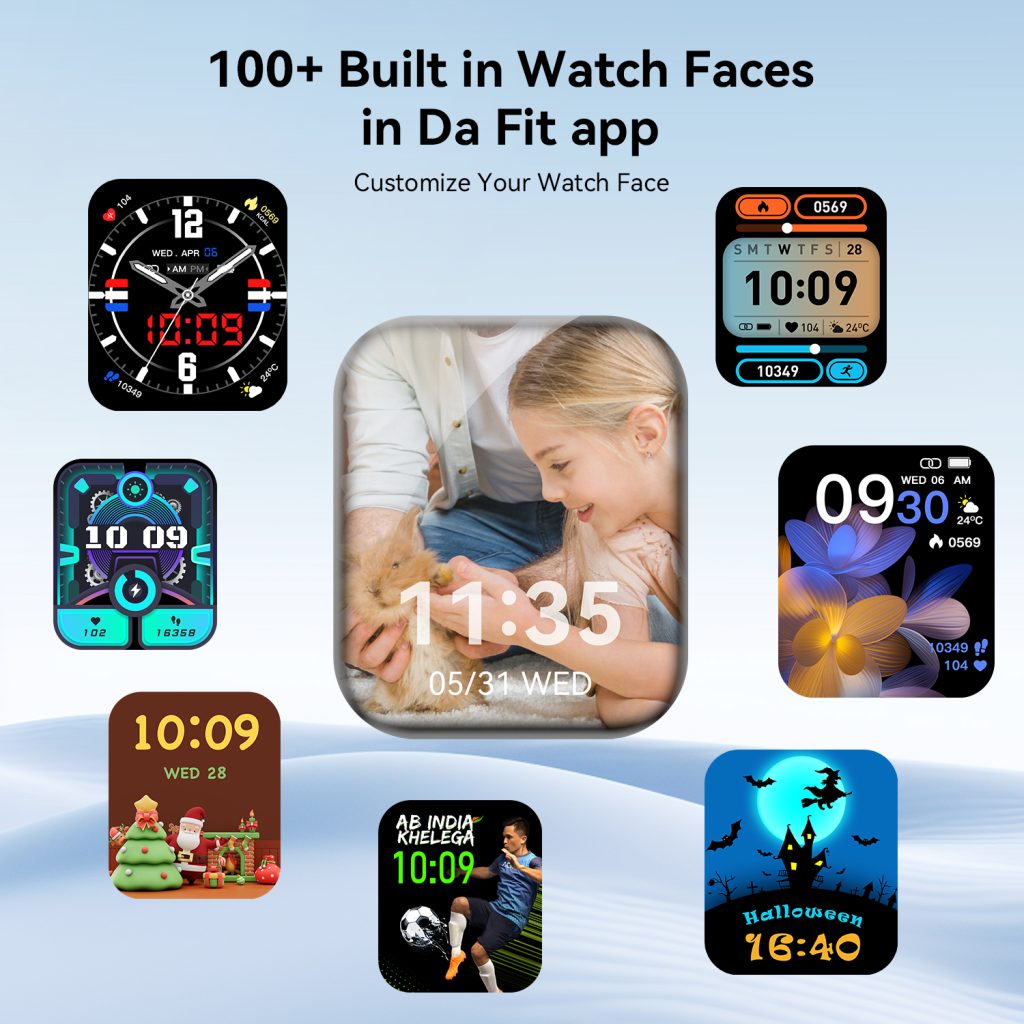
The watch face system has two primary goals: functionality and personalization. Functionality comes first—above all, the watch face must display the time clearly and accurately. But modern users expect more: they want to see their step count, heart rate, battery level, upcoming calendar events, weather, and even notifications at a glance. The watch face system is responsible for organizing all this information in a way that’s easy to read on a small screen, without feeling cluttered or overwhelming. Personalization, meanwhile, lets users tailor the watch face to their style, needs, and habits—whether that’s a minimalist design for work, a sporty layout for workouts, or a sleek, elegant face for formal occasions. The system must support this flexibility, allowing users to switch between faces, adjust widgets, and even create their own designs.
Let’s break down the core components of a watch face system, as understanding these will help you appreciate how it all comes together. The first component is the display driver. This is the software that communicates with the watch’s screen (whether it’s OLED, AMOLED, LCD, or e-ink) to render the watch face. The display driver ensures that the watch face is displayed with the correct resolution, brightness, and refresh rate, and it works with the operating system to optimize power consumption—critical for a device that’s worn all day. For example, on an OLED screen, the display driver can turn off individual pixels to save battery, which is why many watch faces use dark backgrounds for better续航. The display driver also handles transitions between watch faces, ensuring smooth, lag-free switching.
Next is the time engine, the heart of the watch face system. The time engine syncs with the watch’s internal clock (which is often calibrated via GPS or a paired smartphone) to ensure accurate timekeeping. It handles different time formats (12-hour or 24-hour), time zones, daylight saving time adjustments, and even specialized time displays like chronographs, timers, or world clocks. The time engine also communicates with other parts of the system to update the time in real time—so when you switch time zones or adjust the clock, the watch face updates instantly. Without a reliable time engine, the watch face is useless, as its primary function is to tell time.
Another key component is the widget integration layer. This is what allows the watch face to display more than just time—it connects the watch face to the watch’s sensors, apps, and paired devices to pull in real-time data. For example, the widget integration layer might pull heart rate data from the watch’s optical sensor, step count from the accelerometer, weather data from a paired phone or built-in weather app, and calendar events from your phone’s calendar. This layer ensures that all this data is updated regularly (without draining too much battery) and displayed in a consistent, easy-to-read format on the watch face. It also allows developers to create custom widgets that can be added to the watch face, expanding its functionality.
The user interaction module is another essential part of the watch face system. This module handles how users interact with the watch face—whether it’s tapping a widget to open an app, swiping to switch faces, or using the digital crown to adjust brightness or zoom in on details. The interaction module must be responsive and intuitive; users should be able to access the information they need with minimal effort. For example, tapping the heart rate widget on the watch face might open the health app, while swiping left might switch to a different watch face. The interaction module also works with the watch’s haptic feedback system to provide confirmation when a user interacts with the watch face—like a gentle vibration when tapping a widget.
Power management is a critical component of the watch face system, especially for smart watches, where battery life is a top concern. The watch face system is designed to minimize power consumption while still delivering a functional, responsive experience. This includes optimizing the display (using low-brightness modes, dark backgrounds, or always-on display features that use minimal power), limiting the frequency of data updates (e.g., updating weather every 30 minutes instead of every minute), and putting the watch face into a low-power mode when the watch is not in use. The power management component works closely with the operating system to balance functionality and battery life—ensuring that the watch face is always visible and useful, without draining the battery too quickly.
Now, let’s talk about how the watch face system interacts with the rest of the smart watch’s ecosystem. The watch face system is not an isolated module—it integrates with the operating system, apps, sensors, and paired devices to deliver a seamless experience. For example, when you receive a notification on your phone, the operating system sends that notification to the watch face system, which displays a small alert on the watch face (e.g., a icon or a brief message). When you start a workout, the fitness app communicates with the watch face system to display real-time workout data (like heart rate or pace) on the watch face. And when you sync your watch with your phone, the watch face system updates data like weather, calendar events, or step count to ensure everything is up to date.
One of the most important aspects of the watch face system is its compatibility with different watch models and operating systems. A well-designed watch face system should be flexible enough to work with different screen sizes, resolutions, and hardware configurations. For example, a watch face designed for a 1.3-inch screen should scale properly to a 1.5-inch screen, without losing clarity or functionality. The system should also support different operating systems—so a watch face created for watchOS should be adaptable to HarmonyOS or RTOS, with minimal changes. This compatibility is key for developers, who want to create watch faces that work across multiple devices, and for users, who want to have access to a wide range of watch faces regardless of their smart watch model.
The QONBINK smart watch series, for example, features a robust watch face system that balances functionality, personalization, and battery efficiency. Designed to work seamlessly with the brand’s proprietary operating system, the QONBINK watch face system supports a wide range of watch face designs—from minimalist to sporty, from classic to modern—and allows users to customize widgets, adjust brightness, and switch between faces with a simple swipe. The system’s advanced power management ensures that even with always-on display and real-time data updates, the QONBINK smart watch maintains a long battery life, making it ideal for daily use.
It’s also important to distinguish between the watch face system and individual watch faces. The watch face system is the underlying software that enables all watch faces to work, while a watch face is a specific design or layout that uses the system’s components to display time and data. Think of the watch face system as a stage, and each watch face as a different performance— the stage provides the tools and infrastructure, while the performance is the specific design and functionality that users see. Developers create watch faces by using the tools and protocols provided by the watch face system, ensuring that their designs are compatible, responsive, and power-efficient.
Over time, the watch face system has evolved to meet the changing needs of users. Early smart watches had simple watch face systems that could only display time and basic notifications. Today’s systems are much more advanced, supporting dynamic watch faces (which we’ll explore in the next article), custom widgets, third-party watch faces, and even AI-powered personalization. As smart watch technology continues to advance, the watch face system will become even more powerful—integrating with more sensors, supporting more complex data visualization, and offering even greater personalization options.
In conclusion, the watch face system is a critical component of any smart watch, responsible for delivering a functional, personalized, and efficient visual experience. It combines display drivers, time engines, widget integration, user interaction, and power management to ensure that the watch face is not just a way to tell time, but a powerful tool for accessing important information at a glance. Whether you’re using a smart watch for fitness tracking, communication, or daily productivity, the watch face system is the first thing you interact with—and it plays a key role in how you experience your device. Understanding how the watch face system works helps you appreciate the thought and engineering that goes into every smart watch, and it allows you to make the most of your device’s capabilities.
As smart watches become more integrated into our daily lives, the watch face system will continue to evolve, becoming more intelligent, more flexible, and more personalized. It’s not just about displaying time anymore—it’s about creating a watch face that adapts to your needs, reflects your style, and makes your life easier. And with brands like QONBINK leading the way in watch face system innovation, the future of smart watch faces is brighter than ever.
Leave a Comment
Your email address will not be published. Required fields are marked *