
Smart watches are incredibly useful when worn correctly, but small wearing errors can turn a great device into an uncomfortable, inaccurate, or even frustrating one. Many people slap it on like a regular watch and never think twice—until the heart-rate readings go wild, the strap irritates their skin, or the watch keeps sliding around.
Wearing It Too Loose or Too Tight
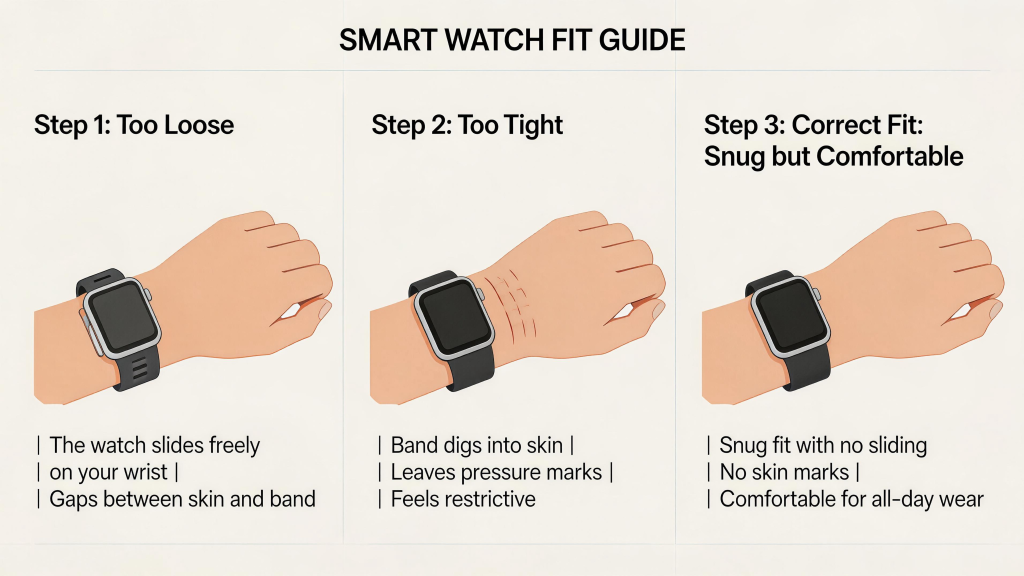
Fit is the single biggest factor in both comfort and sensor performance.
Too loose, and the watch shifts during movement. Optical heart-rate sensors (the green lights on the back) need consistent skin contact to read accurately—when the watch slides, you get erratic spikes, dropped readings, or outright nonsense during workouts. GPS and step counting can also suffer because the device isn’t stable on your wrist.
Too tight, on the other hand, restricts blood flow, causes redness or dents in the skin after a few hours, and can make the sensors press unevenly, leading to false high heart-rate readings (especially when you’re resting). It also feels suffocating during sleep tracking, so many people end up taking it off halfway through the night.
The fix is simple: aim for snug but not constricting. You should be able to slide two fingers comfortably underneath the strap when your arm is relaxed. The watch should stay in roughly the same position when you shake your wrist, but not leave deep marks when you remove it. Check the fit every few weeks—skin can swell slightly with heat, exercise, or even salt intake.
Positioning the Watch Incorrectly on Your Wrist
Where you place the watch matters more than most realize.
The classic mistake is wearing it too high on the wrist (almost on the hand) or too low (down toward the forearm). Both positions throw off sensors. Heart-rate monitors work best about one finger-width above the wrist bone (the prominent bump on the outside). Too high, and the watch sits over tendons and veins that move a lot; too low, and it’s on thicker skin with less reliable blood-flow signals.
Many people also rotate the watch so the crown or buttons face inward toward the body. While it might feel more comfortable for typing, this often misaligns the sensors away from the radial artery (the main pulse point), hurting accuracy.
Best practice: keep the watch face-up on top of the wrist, sensors centered on the flat inner side, roughly one finger above the wrist bone. If your model has a specific sensor layout, follow the manufacturer’s recommended placement—most include a quick diagram in the app or manual.
Choosing the Wrong Strap Material or Style for Your Lifestyle
Strap choice is often an afterthought, but it can ruin the experience fast.
Silicone sport bands are great for workouts and swimming, but they trap sweat and heat during all-day office wear, leading to itchy rashes or bad odors. Leather looks sharp with business outfits, but it absorbs moisture and smells after intense activity or hot days. Metal mesh or links are durable and stylish, yet they can pinch skin or feel cold in winter.
Another common error is sticking with the stock strap forever. If your wrist is small, the default band might be too long and floppy; if large, it might dig in at the edges.
Rotate straps based on your day: breathable nylon or perforated silicone for active use, soft leather or fabric for casual/office, and quick-release options so you can change them in seconds. Clean silicone bands regularly with mild soap, and let leather breathe between wears.
Ignoring Environmental Factors While Wearing It
A few situational mistakes catch people off guard.
Wearing the watch during heavy sunscreen, lotion, or bug spray application can coat the sensors, blocking light and ruining heart-rate tracking for hours. Saltwater, chlorine, and even excessive sweat without rinsing can build up and degrade charging contacts or speaker grilles over time.
Extreme temperatures matter too. Leaving the watch in a freezing car or direct summer sun for long periods can stress the battery and materials. And yes, some people still shower with non-waterproof models or wear them in saunas, then wonder why the device died.
Quick habits help: wipe sensors clean after sweaty sessions, remove the watch before applying creams, and avoid temperature extremes. If you swim often, rinse with fresh water afterward—even “waterproof” watches appreciate it.
Not Adjusting Settings After Changing How You Wear It
Finally, many users forget that wearing style affects software performance.
If you switch from loose to snug, or move the position slightly, heart-rate and sleep algorithms may need recalibration. Some watches let you manually tell the device you’ve adjusted fit or position through the companion app. Ignoring this leads to weeks of slightly off data.
Also, update the firmware and watch face regularly—newer software often improves sensor accuracy for different skin tones, tattooed wrists, or varied wearing positions.
Most smartwatch problems aren’t hardware failures—they’re wearing mistakes. Get the fit snug-but-comfortable, position it correctly, match the strap to your lifestyle, protect it from the environment, and tweak settings when needed. Do these things right, and your watch will deliver accurate data, feel great all day, and last years longer.
Leave a Comment
Your email address will not be published. Required fields are marked *