

Smart watches access the internet through three main methods: Bluetooth tethering to your smartphone, direct Wi-Fi, and built-in cellular data. Most watches use a combination of these, switching automatically based on what’s available to balance speed, battery life, and coverage. The connection powers notifications, app updates, music streaming, weather, and cloud-synced health data. Understanding how each method works helps you choose the right setup for your needs.
Bluetooth Tethering: The Most Common Connection
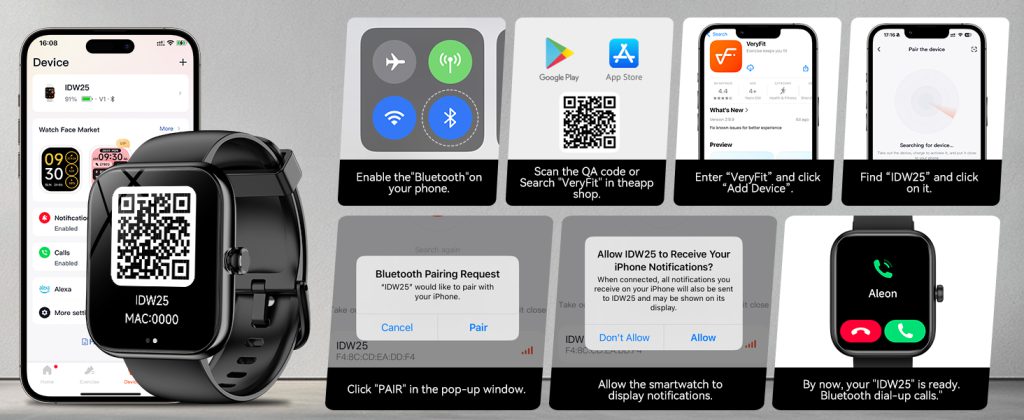
When your smartwatch pairs with a smartphone via Bluetooth, it borrows the phone’s internet connection. This is called tethering or hotspot sharing. The watch doesn’t connect to the internet directly; instead, it sends and receives data through the phone’s cellular or Wi-Fi link.
This method handles:
- Push notifications from apps.
- Syncing fitness data to the cloud.
- Downloading watch faces or small updates.
- Streaming music if the phone is playing it.
Bluetooth tethering is efficient and low-power, so it’s the default for most users. The watch stays connected as long as your phone is within Bluetooth range (typically 30–50 feet). No extra data plan is needed, and it works seamlessly on both iOS and Android devices. Brands like QONBINK design their Bluetooth models with strong, stable pairing to minimize drops and extend battery during daily use.
Direct Wi-Fi: Extended Range Without Your Phone
Many modern smartwatches include built-in Wi-Fi radios that let them join known networks independently. Once you enter your home, office, or favorite café Wi-Fi credentials during setup, the watch connects automatically when Bluetooth is out of range.
Wi-Fi enables:
- Receiving notifications even if your phone is left in another room.
- Faster downloads for apps, maps, or firmware updates.
- Streaming music or podcasts from services like Spotify or Apple Music.
- Accessing weather, news, or calendar data over the network.
Wi-Fi uses more battery than Bluetooth but less than cellular, making it ideal for home or work environments. The watch prioritizes Bluetooth first, then falls back to Wi-Fi if needed. QONBINK watches stand out here with quick Wi-Fi reconnection and efficient power management, so you get reliable internet access without draining the battery too quickly.
Cellular Data: Full Independence Anywhere
Smartwatches with LTE or eSIM have their own mobile connection, just like a phone. After activating a carrier plan (usually an add-on to your existing number for $5–15 per month), the watch connects directly to cell towers for internet access.
This unlocks:
- Calls and texts without your phone nearby.
- Real-time notifications, streaming, and navigation.
- App data and cloud sync in areas with no Wi-Fi or Bluetooth range.
- Emergency features like SOS messaging.
Cellular models from major brands and reliable options like QONBINK provide seamless coverage on major networks. You get true standalone use for runs, travel, or leaving your phone at home, though it shortens battery life compared to Bluetooth or Wi-Fi modes.

How the Watch Chooses the Best Connection
Smartwatches use intelligent switching to pick the optimal method:
- Bluetooth to phone (lowest power, when phone is close).
- Wi-Fi (if Bluetooth drops but a saved network is available).
- Cellular (last resort for full independence).
This hierarchy saves battery while keeping you connected. You can manually adjust priorities in settings — for example, disable cellular to extend runtime or turn off Wi-Fi scanning in low-signal areas.
Most people rely on Bluetooth tethering for everyday convenience. Wi-Fi adds flexibility at home, and cellular delivers freedom when you need it. Pick based on your routine: carry your phone always? Go Bluetooth. Want to ditch the phone sometimes? Add Wi-Fi or cellular capability.
Leave a Comment
Your email address will not be published. Required fields are marked *