
Smart watches promise so much—better sleep, more movement, less stress, clearer health insights—but within the first few weeks most owners run into the same set of questions and frustrations. Why does the sleep score not match how I feel? Is this battery dying already? Should I wear it tighter for “accuracy”? Can I really swim with it? Why do two identical workouts show different numbers?
1. How accurate is the sleep tracking / sleep score?
Not as accurate as a hospital sleep study (which uses brain-wave sensors), but good enough for everyday patterns.
What it does well:
- Total time in bed vs time asleep.
- Rough estimate of wake-ups.
- Overall trends when you keep a consistent schedule (earlier bedtime usually = higher average score).
What it struggles with:
- Precise “deep” vs “light” vs “REM” labeling (no brain-wave detection).
- Brief awakenings that feel big to you but get marked as “light sleep”.
- Stress, alcohol, late heavy meals, or anxiety that fragments sleep without obvious motion.
Most common mismatch: you feel terrible after an “excellent” score, or great after a “poor” one. That happens because the watch misses mental/emotional load, digestion, hormones, or tiny interruptions it can’t sense.
What experienced users do:
- Focus on consistency (bedtime and wake time within ±30 minutes) and total hours (aim for your personal 7–8 h sweet spot).
- Look at weekly/monthly averages to spot real levers (alcohol reliably cuts deep sleep %, late caffeine delays fall-asleep time).
- When score and how you feel disagree → trust how you feel. The score is a rough diary entry, not a medical verdict.
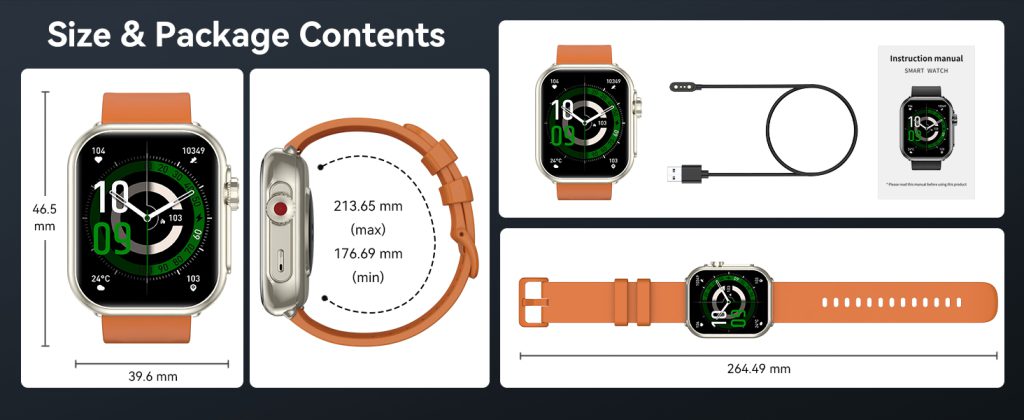
2. How tight should the band be? People keep saying “snug” but my wrist gets sore.
“Snug” is the most misunderstood word in every setup guide.
Correct fit that gives reliable data without pain:
- After fastening, you should still comfortably slide one finger underneath the band.
- No visible indentation or red mark after taking it off for 10+ minutes.
- No tingling, numbness, cool fingers, throbbing, or ache by the end of the day.
- Slightly looser at night (one extra notch) — better blood flow usually gives cleaner overnight heart-rate variability (HRV) and recovery readings.
Why too tight is bad:
- Traps sweat + dead skin → redness, itchiness, dry patches, or small pimples under the band.
- Compresses capillaries under the sensor → heart-rate readings can become erratic or HRV artificially lowered.
- Long-term pressure → mild nerve irritation (pins-and-needles, forearm ache).
Most people start too tight chasing “perfect” heart-rate graphs. Loosen it. In almost every case the data becomes more stable, not less.
3. Why is my battery life so much worse than what the box promised?
Official “up to XX hours” numbers are measured in unrealistic lab conditions: minimal notifications, no always-on display, heart rate sampled every 10 minutes, low brightness, no GPS, no LTE. Real life is brutal on battery.
Biggest everyday drains:
- Always-on display (cuts runtime by 30–50% on most models).
- Frequent notifications + wrist raise to wake.
- Continuous 24/7 heart rate + occasional blood oxygen scans.
- GPS workouts (each hour of continuous GPS can eat 10–20%).
- Hot weather (battery chemistry hates sustained heat).
- Lots of complications/widgets refreshing in the background.
- Battery health already below 90% (normal wear after 18–24 months).
Quick wins that add hours without losing much:
- Turn off always-on during sleep or long focus blocks.
- Lower wrist-raise sensitivity or disable it overnight.
- Switch heart rate to “every 10 minutes” when not training.
- Use low-power / theater mode on low-battery days or flights.
- Charge to 80–90% most days instead of 100% (less heat stress).
If you’ve done all that and it still dies before bedtime on a normal day, battery health has dropped too far — time to think about replacement or optimized charging habits.
4. Can I really swim, shower, or sauna with it?
Almost every smartwatch sold in the last few years is rated 50 meters water resistant. That means it survives swimming, showering, rain, and accidental splashes.
Safe in practice:
- Daily shower (hot or cold).
- Pool swimming or ocean dips (fresh water preferred for longevity).
- Heavy sweat during workouts.
- Light rain.
Avoid or be careful:
- Sauna / steam room (extreme heat + steam degrades seals over time).
- High-pressure water jets (power shower heads, car washes).
- Scuba diving or snorkeling beyond shallow depths (50 m is static pressure, not dynamic diving rating).
- Saltwater without immediate fresh-water rinse (salt corrodes ports and seals).
Best habit:
- Rinse with fresh water after any salt, chlorine, or heavy sweat.
- Dry the band and case before charging.
- If the silicone band starts to smell, deep clean or replace it.
- Never charge while wet (corrosion risk in the port).
5. Why do two identical workouts show different calorie burn, heart-rate zones, or pace on different watches (or even the same watch on different days)?
Optical heart-rate sensors and motion algorithms are good but far from perfect. Differences come from:
- Wrist placement and tightness (looser fit = more light leakage = jumpier heart rate).
- Skin tone, tattoos, arm hair, cold hands (darker skin / ink / hair block light, cold reduces blood flow).
- Motion style (bouncy running vs smooth cycling confuses the accelerometer).
- Different brand algorithms (Apple weights zones one way, Garmin another, Samsung another).
- Daily variables (morning vs evening body temperature, hydration, caffeine, fatigue state).
Even on the same watch:
- Tired legs = higher heart rate at the same pace/power.
- Hot vs cool weather = different sweat and blood-flow patterns.
- Fueling (carbs vs fasted) changes how hard the heart works.
Bottom line: treat calorie estimates, zone times, and even pace as directional trends, not lab-grade precision. Month-to-month averages on the same device tell you more than day-to-day or cross-brand comparisons.
6. Should I charge to 100% every time? Is overnight charging on the wrist bad?
Lithium-ion batteries prefer partial charges. Keeping the battery at 100% for long periods (especially while warm from the body) speeds up capacity loss.
Better daily habits:
- Charge to 80–90% most days (many watches show exact % — stop manually or enable “optimized/ adaptive charging”).
- Avoid repeated full discharges below 20%.
- Overnight charging while worn adds constant low heat to your skin → slightly faster skin irritation + noisier overnight heart-rate and HRV data.
- Charge during your evening routine (shower, dinner, reading) so you go to bed at 40–80%.
If your watch has built-in optimized charging (Apple, Samsung, Google), turn it on — it learns your wake-up time and holds at 80% until shortly before you get up.
7. Why does heart rate look wrong or jumpy during some workouts?
Optical sensors have known blind spots:
- High-intensity intervals or sprints (heavy arm motion causes artifacts → spikes or dropouts).
- Cold hands or poor circulation (reads too low).
- Tattoos directly over the sensor (blocks light → erratic).
- Unusual arm swing (very stiff arms or cross-body pumping confuses the sensor).
Quick workarounds:
- Tighten the band slightly during intense sessions (still comfortable — no pain).
- Switch to the opposite wrist for problem workouts.
- Pair a chest-strap heart-rate monitor via Bluetooth for races or key sessions (far more accurate).
- Clean the sensor area right before starting (sweat + lotion residue interferes).
For casual or moderate training the wrist sensor is good enough. For serious athletes chasing precise training zones, a chest strap is still more trustworthy.
8. Is it safe to wear 24/7? Any real long-term skin or health risks?
For the vast majority of users — yes, safe. But not zero risk.
Most common issues:
- Irritant contact dermatitis (red, itchy band-shaped rash from trapped sweat, bacteria, lotion residue).
- Rare nickel allergy from some metal buckles or sensors.
- Pressure marks, folliculitis, or small pimples from constant tight wear.
How to prevent almost all of them:
- Take the watch off every night for at least 30–60 minutes (shower + let skin breathe).
- One full untracked day per week (no rings, no scores, just normal life).
- Rotate between left and right wrist every few days/weeks.
- Daily quick wipe of band and sensor (damp cloth); weekly mild soap + air dry.
- If redness appears → switch to more breathable band (nylon, perforated silicone) and pause wear 1–2 days.
Radiation / EMF concerns:
- Uses Bluetooth Low Energy + occasional Wi-Fi / LTE — very low non-ionizing RF power.
- Exposure far lower than holding a phone to your head.
- No credible evidence of harm from normal wear (safety limits are set very conservatively).
- If worried → turn on airplane mode at night (still tracks offline steps, heart rate, sleep).
Listen to your skin. Persistent redness, itching, or marks = pause, clean, loosen, change band.
9. How long should a good smartwatch realistically last before I need to replace it?
Real-world timeline before most owners replace:
- Battery still usable for full days: 2.5–4 years (health drops to 80–85%).
- Meaningful software updates: 3–5 years (major new health features often stop after ~4 years).
- Physical condition still acceptable: 3–5 years before scratches, button wear, or port issues become annoying.
- Life goals change: the most common real reason people upgrade.
With good care (no overnight charging on wrist, regular cleaning, screen protector, partial charges) many Series 7/8 owners in 2025 still get 30+ hours daily and receive current software.
10. New or second-hand — which is better value?
New if:
- You want the absolute latest sensors (temperature, advanced apnea detection, improved readiness algorithms).
- You hate any sign of previous use (micro-scratches, faint marks).
- You plan to keep the watch 4+ years.
Second-hand if:
- You want flagship-level experience for mid-range money (Series 8/9, Watch 6, Pixel Watch 2 often 50% off retail).
- Battery health ≥85% and seller is transparent.
- You’re comfortable with 1–2 fewer years of future updates.
Quick second-hand buying checklist:
- Meet in person or use protected payment (PayPal Goods & Services, platform escrow).
- Demand battery health screenshot before paying.
- Test GPS lock, heart rate, charging, buttons on the spot.
- Ask for original box, charger, and any spare bands.
- Walk away if seller refuses video call or in-person inspection.
One-Line Quick Reference – the most repeated questions
- “Battery dying already?” → Below 85% health and can’t last your normal day → replacement time approaching.
- “Sleep score low but I feel great?” → Trust how you feel.
- “Can I shower / swim?” → Yes (rinse after salt/chlorine).
- “Overnight charging on wrist OK?” → Better to charge during evening routine.
- “Safe for years of 24/7 wear?” → Mostly yes — give skin nightly breaks.
- “How tight?” → One finger underneath, no marks, no tingling.
- “New or used?” → Used saves 40–60% if battery ≥85% and seller transparent.
A smart watch is a tool — not a doctor, not a coach, not a judge. When you stop treating every dip and spike as absolute truth and start treating it like a quiet assistant that reminds you to move, breathe, drink water, and go to bed on time, most of the frustration disappears. It’s there to show patterns and nudge you gently. The rest — the real decisions — are still yours.
That’s the FAQ no official manual ever tells you.
Leave a Comment
Your email address will not be published. Required fields are marked *